Payments & Revenue Protection
Connect PayTR payments
Set up PayTR marketplace readiness for Turkish reservation payments, gift-card checkout, and merchant payouts.
What PayTR is used for
PayTR marketplace is the payment provider used for supported Turkish online payment flows in Reslify. For guests, Reslify uses it for PayTR-backed reservation deposits or prepayments and, when the restaurant is eligible, public gift-card checkout. For the restaurant, the same integration holds the beneficiary details used for merchant payout batches.
Reslify manages the technical PayTR checkout and callback flow. The merchant-facing task is to review the integration state and keep payout details accurate.
Check PayTR from Settings / Integrations.
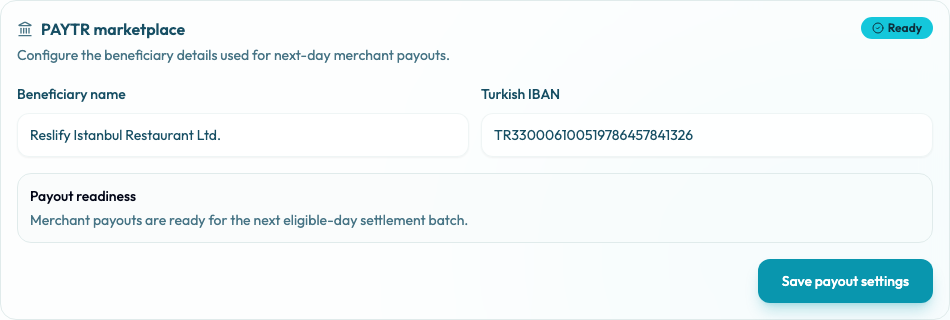
Review the integration state
- Open Settings / Integrations.
- Find PAYTR marketplace.
- Review the badge: Ready, Action required, Blocked, or Not available.
- Review Payout readiness and any validation errors.
- Confirm that Beneficiary name and Turkish IBAN match the restaurant's payout account.
- Select Save payout settings after changing beneficiary details.
- Contact Reslify support if the card is Blocked, Not available, or the beneficiary details cannot be validated.
Unlike self-serve Stripe onboarding, PayTR marketplace setup may involve Reslify operations and merchant verification details. The panel card is the merchant-facing readiness view.
Understand what Ready controls
PayTR has two separate readiness concerns:
- Reservation deposits and prepayments use PayTR checkout when the restaurant has an enabled PayTR marketplace integration. The guest payment is confirmed through the PayTR callback before the paid reservation is completed.
- Gift-card selling requires PayTR marketplace to be enabled and Payout readiness to be Ready. If it is not ready, Settings / Gift Cards keeps existing products and issued cards visible, but product edits and public checkout stay blocked.
- Merchant payout batches require valid beneficiary details. Ready means payouts are ready for the next eligible-day settlement batch; missing or invalid beneficiary details keep payouts pending until corrected.
When PayTR should be ready
Before publishing Turkish online payment flows, confirm the PayTR card does not show Blocked or Not available. If Payout readiness is Action required, reservation checkout may still depend on whether PayTR is enabled, but gift-card selling and merchant payout batches are not ready.
Complete payout details before promoting gift-card sales or relying on PayTR payout settlement.
What to check before launch
Before sending guests to a PayTR-backed checkout:
- Confirm the PayTR card appears under Settings / Integrations.
- Confirm Beneficiary name and Turkish IBAN are saved and Payout readiness is Ready.
- Make a test reservation that requires a deposit or prepayment.
- Confirm the guest returns to the reservation confirmation page after payment.
- Review the reservation payment details in the panel.
- If selling gift cards, open Settings / Gift Cards and confirm the page status is Ready, not Selling disabled.