Payments & Revenue Protection
Create a deposit policy
Require an upfront deposit for an experience, limit it by party size when needed, and define the paid-commitment outcomes guests accept.
What a deposit policy does
A deposit policy charges the guest an upfront amount when they book. Restaurants usually use deposits for high-demand services, larger parties, tasting menus, event nights, or any reservation where an empty table creates meaningful revenue loss.
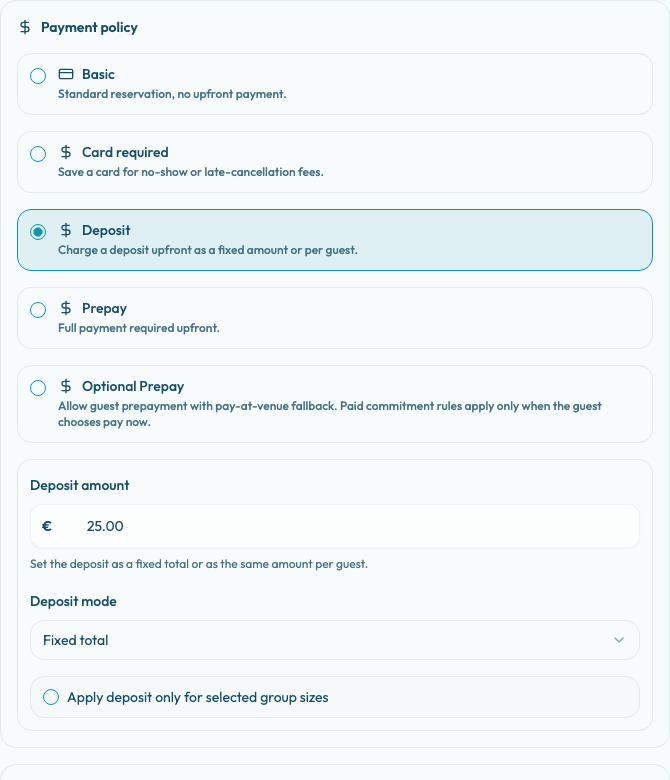
Deposit policies are configured per experience in Settings / Experiences. Open New Experience or Edit Experience, then use the Payment tab and the Payment policy section.
Before you configure it
Confirm these items before sending guests to a deposit-backed experience:
- The restaurant has a ready payment setup for reservation checkout, such as a ready Stripe account or an enabled PAYTR marketplace integration.
- The experience's Reservation settings allow the party sizes that should be able to book.
- The restaurant has decided whether the deposit is a fixed amount for the booking or an amount charged per guest.
- The team knows what should happen when the guest cancels, when staff cancels, and when the guest does not show.
A deposit can be configured before provider readiness is complete, but public checkout needs the provider to be ready when guests book.
Configure the deposit
- Open Settings / Experiences.
- Create or edit the experience that should require a deposit.
- Go to the Payment tab.
- In Payment policy, select Deposit.
- Enter a Deposit amount greater than zero.
- Choose Deposit mode:
- Fixed total charges the same deposit once for the reservation.
- Per guest multiplies the deposit amount by the selected party size.
- If only some party sizes should pay a deposit, turn on Apply deposit only for selected group sizes.
- Enter Min guests, Max guests, or both.
- Review the Cancellation policy section below the payment policy.
- Save the experience.
If the group-size condition is on, bookings outside the range remain available but no deposit is required. For example, a condition of Min guests 6 means parties of 1-5 continue through the normal approved or request flow, while parties of 6 or more are sent through deposit payment.
Define paid commitment outcomes
Deposit experiences must use Paid commitment rules in the cancellation policy section. These terms are shown to guests and stored with the reservation they accept, so review the generated preview before publishing.
Configure three areas:
- When the guest cancels: build a complete timeline from booking time to reservation start. Each window can give the guest a Cash refund, Venue credit, or No refund.
- When your team cancels: choose the outcome applied when staff cancels the reservation. Cash refunds note that Stripe processing fees from the original payment are still borne by the merchant.
- When the guest does not show: choose the no-show outcome. This policy is configured here, but the no-show settlement is applied manually in Operations after staff marks the reservation as no-show.
Use Add window below when the guest cancellation timeline needs another deadline. The policy must cover cancellations from booking time until reservation start without gaps or overlaps.
What guests see
Guests see the deposit requirement on the public booking flow before submitting the booking. The portal shows the amount as {amount} deposit required for a fixed total or Pay {amount} per guest deposit for a per-guest deposit.
If a deposit condition exists, guests inside the range see the deposit requirement with the party-size condition. Guests outside the range see that no deposit is required for their party size and continue through the normal approved or request flow.
When a deposit is required, the booking creates a pending payment reservation intent. The reservation becomes confirmed only after the payment provider confirms the payment. If payment fails or is abandoned, the reservation should not be treated as confirmed.
Keep public text aligned
Make the experience description, guest policies, and Guest-facing terms preview consistent with the deposit setup. A guest should not have to guess whether the deposit is refundable, converted into venue credit, or forfeited after a deadline.
If the deposit is intended to be credited to the final bill, say that in the guest-facing text. The payment settings define the amount collected and the cancellation outcomes; they do not replace the restaurant's public explanation of how the deposit is used during service.