AI Concierge
Troubleshoot Booking Copilot
Troubleshoot Booking Copilot availability, public context, and guest-facing fallback behavior.
If the assistant is not visible
Open Settings / Booking Copilot and confirm Active is enabled. Select Save Changes, then reload the public booking page and look for Ask AI or the AI Booking Assistant panel beside the manual booking form.
If Booking Copilot is inactive, the guest-facing assistant is hidden. Guests can still complete the manual booking flow.
Also confirm you are viewing the correct public booking page for the restaurant you changed. Booking Copilot uses the selected restaurant's saved settings, so a different restaurant page can look like the assistant is missing or using the wrong information.
If answers are incomplete
Review Public context. Add missing public facts that guests often ask about, such as parking, pets, accessibility, dress code, or dietary guidance.
Also check the structured settings that control actual booking behavior: experiences, shifts, tables, payments, guest policies, and portal availability.
If public context is not saved
After selecting Save Changes, the panel should show Booking Copilot settings saved. If it shows Failed to save Booking Copilot settings, check the restaurant selection, try saving again, and escalate if the error repeats.
If the field is too long, the panel shows Public context must be 4,000 characters or fewer. Shorten the text before saving. Keep operational rules in structured settings instead of packing them into public context.
If Booking Copilot pauses during checkout
During reservation, payment, or redirect steps, the assistant can pause input while the booking flow completes. Guests may see AI is paused while this step completes or AI is checking the form.
This is expected. Ask the guest to finish the active booking step first. The manual form remains the source of truth for completing the reservation.
If Booking Copilot is temporarily unavailable
Guests may see AI is temporarily unavailable. Try again in a moment. if the assistant cannot respond. Retryable turn failures are retried once automatically after a short backoff. Provider, configuration, authorization, or output failures show the unavailable fallback instead of blocking the guest.
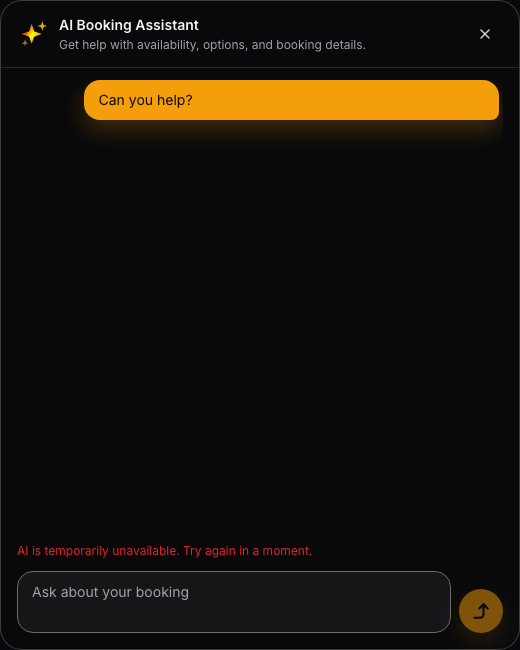
Guests can continue through the manual booking form while AI is unavailable.
If an AI action cannot be applied
When Booking Copilot suggests an action, guests choose Apply or Dismiss. If Apply fails or the action no longer matches current availability, ask the guest to dismiss it and continue manually from the visible booking form.
Recheck availability, experiences, payment requirements, and guest policies if the same action keeps failing for the restaurant.
What to check before escalating
- Confirm Active is enabled.
- Confirm the public booking page is the correct restaurant.
- Confirm Public context is saved and does not exceed 4,000 characters.
- Confirm availability, experiences, payments, and policies support the guest's request.
- Confirm the assistant is not paused because a reservation, payment, or redirect step is completing.
- Try the manual booking flow to verify reservations still work.