Experiences & Add-ons
Archive add-ons and groups
Archive add-on items or groups that should no longer be available during reservation, and understand what restoration requires.
What archiving does
Archiving removes an add-on item or group from active booking use while preserving it in Settings / Addons. Use it for seasonal extras, retired offers, sold-out items, or groups that should no longer appear in new booking paths.
Archived records stay visible in the panel with an Archived badge. They are removed from the public booking data used by the booking page and widget, so guests should not see archived items or archived groups in the Select Add-ons step.
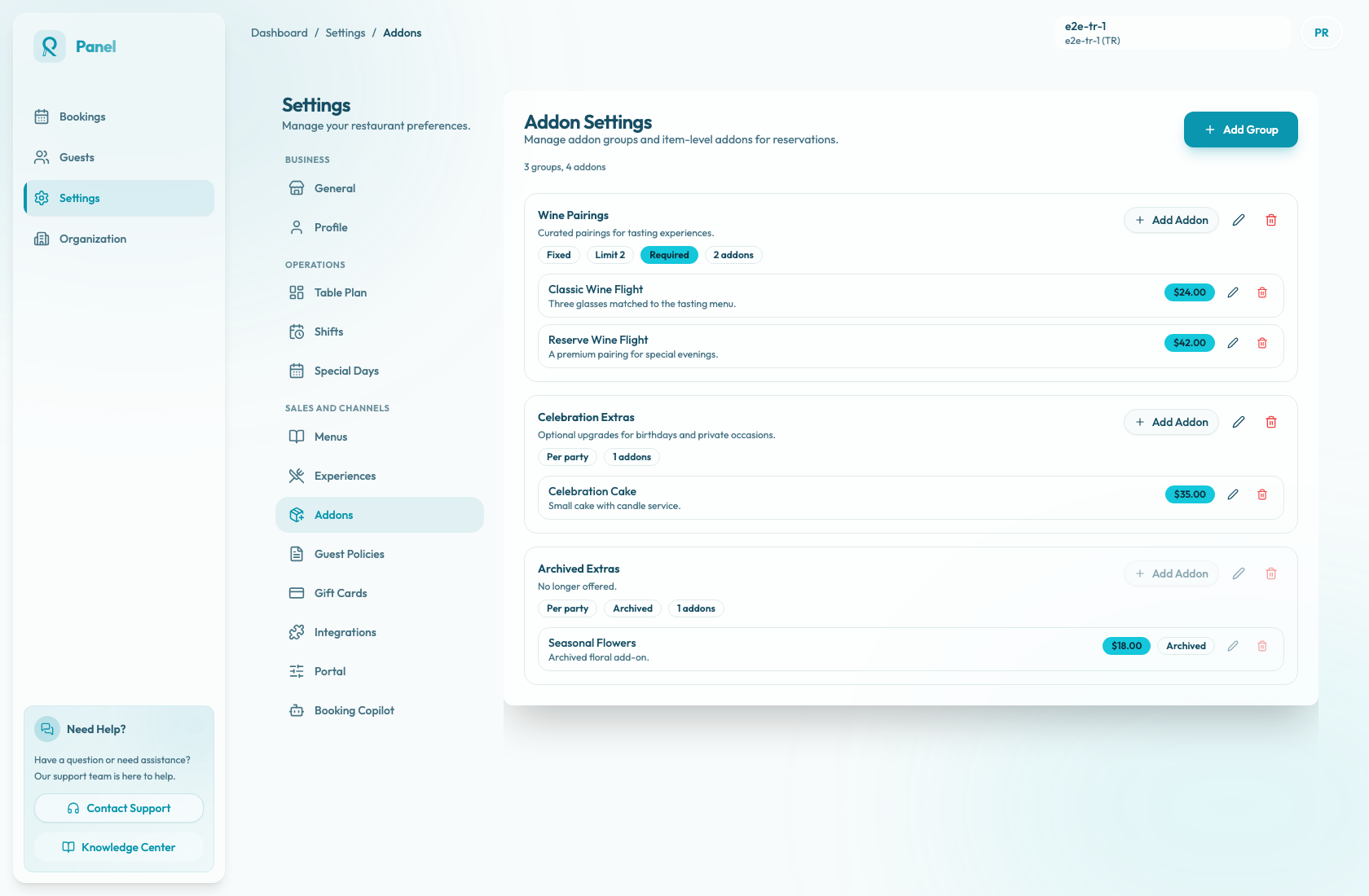
Archive an add-on item
- Open Settings / Addons.
- Find the active group and the item.
- Click the trash icon on the item row.
- In the Archive addon? dialog, confirm Archive.
The item is marked Archived. Its edit and archive buttons are disabled, but the parent group stays active and remains attached to any experiences that already use the group.
Because the group remains attached, check whether the group still has at least one active item. If the group is required and the last active item is archived, guests can be left with a required add-on section that has nothing selectable.
Archive a group
Archive a group when none of the items in that group should be used. A group archive is stronger than archiving one item because it removes the whole selection area from active use.
- Open Settings / Addons.
- Find the active group.
- Click the trash icon on the group card.
- In the Archive addon group? dialog, confirm Archive.
The group is marked Archived. Add Addon, edit group, and archive group controls are disabled. Item-level edit and archive controls inside that group are also disabled while the group is archived.
Archiving a group does not individually archive the items inside it. They remain in the group for reference, but guests cannot reach them while the group is archived.
Archiving a group also removes the group from every attached experience. Those experiences remain active, but their Available Addon Groups selection no longer includes the archived group, and the public booking widget no longer shows that add-on section for them.
Restore behavior
The current Addon Settings page does not provide a self-serve Restore button for archived add-on items or groups. Archived cards stay visible, but their edit and archive controls are disabled.
The underlying archive state can be toggled back by an operational support or admin action. When an item is restored, it becomes usable again only if its parent group is active and the group is attached to the relevant experience. When a group is restored, the group becomes active in Settings / Addons, but it is not automatically reattached to experiences because archiving removed those links. Reopen each experience and select the group again from Available Addon Groups before relying on it in public booking.
Operational checks
Before archiving an item, review the parent group. If it is required, confirm there will still be an active item guests can select, or archive/detach the whole group instead.
Before archiving a group, note which experiences use it. After archiving, open each affected experience and confirm the group is no longer selected. Preview the booking page or widget to confirm guests no longer see retired extras or empty add-on groups.
After any support-assisted restore, review the item price, group limit, required setting, and experience attachments. Then test the booking path through Select Add-ons with a realistic party size.
When to create a new item instead
If only the name, description, or price changed, edit the existing item. If the offer is meaningfully different, archive the old item and create a new one so the old setup remains understandable.