Experiences & Add-ons
Understand duration and party-size rules
Understand how party-size limits, stored duration, and timing rules affect bookable capacity and guest availability.
Why duration and party size matter
Experience availability is not only a check that the restaurant is open. Reslify checks the selected experience, party size, notice window, table or combination capacity, shift availability, existing reservations, booking gap, and the experience duration before it returns a bookable slot.
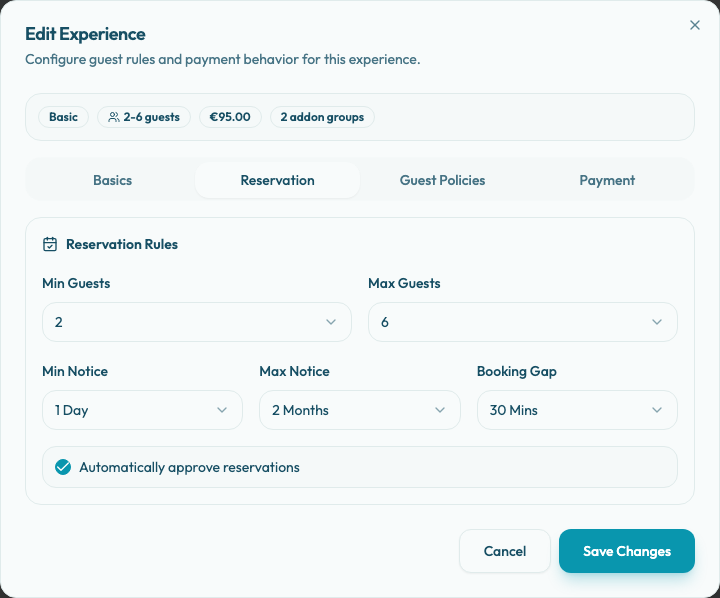
Use Settings / Experiences, open the experience, and choose the Reservation tab to review the guest-count and timing rules shown in this guide. The current Reservation tab does not show a separate duration field, but the stored experience duration still affects how long each slot occupies capacity.
Set the party-size range
Set Min Guests to the smallest party size the experience should accept. Set Max Guests to the largest party size the experience can serve.
The current panel selector offers values from 1 to 20. Reslify validates that Max Guests is greater than or equal to Min Guests before saving.
These limits are the first eligibility check. A tasting menu with Min Guests set to 2 will not be offered to a party of 1. A private-room experience with Max Guests set to 6 will not be returned for a party of 8.
Then confirm the table plan can actually seat the allowed parties. A maximum of 8 guests is useful only if the relevant shift and area have a table or table combination that can seat 8.
Understand duration
Duration is stored in the experience booking settings and is used by the availability engine when it checks table overlap. If party-size-specific duration rules exist, Reslify uses the matching duration for that party size; otherwise it falls back to the default duration.
Longer durations occupy tables for longer and can remove later slots. Shorter durations can create slots the team cannot serve if preparation, seating, or turn time is underestimated. Review duration together with Min Guests, Max Guests, and Booking Gap before publishing high-prep experiences, events, or large-party formats.
Configure timing rules
Use the timing fields to control how soon and how far ahead guests can book:
- Min Notice: how soon a guest can book.
- Max Notice: how far ahead the experience is available.
- Booking Gap: extra buffer between reservations when Reslify checks whether a table overlaps another booking.
In the current panel, Min Notice options are None, 1 Hour, 2 Hours, 5 Hours, 12 Hours, 1 Day, 2 Days, and 1 Week. Max Notice options are 1 Month, 2 Months, and 3 Months. Booking Gap options are None, 15 Mins, and 30 Mins.
When multiple experiences are live, the public date picker may show dates because another experience has a wider booking window. The selected experience still needs its own notice rules, shift availability, table capacity, duration, and booking gap to return slots.
Choose approval behavior
Use Automatically approve reservations when eligible bookings can become approved reservations without staff review. Leave it off when the team should review requests before accepting them.
Payment and guarantee flows can take over the final guest action. For example, a deposit, prepaid experience, optional prepayment, or card guarantee requirement can send the guest through that flow instead of using only the auto-approval setting.
Practical examples
Use tighter rules for experiences that need preparation, such as tasting menus, prepaid events, private rooms, or large-party formats. These often need a higher Min Notice, narrower party-size range, longer stored duration, and a Booking Gap.
Use broader rules for normal reservation types where the restaurant can accept a wider range of parties, shorter notice, and faster turns. Keep the range aligned with real table capacity so the booking page does not show parties the floor cannot seat.
Test after saving
Preview the guest booking page or widget and test:
- a party size below the minimum
- a party size inside the range
- a party size above the maximum
- a date inside the notice window
- a date outside the notice window
- a party size that should use a different stored duration, if duration rules exist
- whether the final action is approve, request, deposit, prepay, or card guarantee