Guest Management
Delete a guest profile
Remove a saved guest profile from the Reslify Guests page without changing historical reservation snapshots.
When to delete a profile
Delete a guest profile from the panel Guests page when the saved directory record is clearly incorrect, duplicated, or should no longer be selected by the team. If the details are merely outdated, edit the profile instead.
Open the guest row action menu and select Delete Guest.
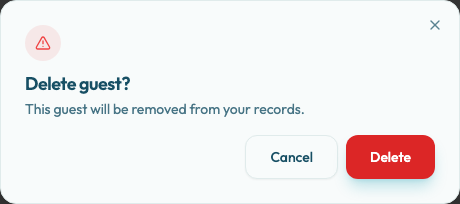
Confirm carefully
The Delete guest? confirmation dialog explains: "This guest will be removed from your records." Select Delete only when the team is sure the saved profile should disappear from the guest list.
Use Cancel if you opened the dialog by mistake or need to compare another profile first.
After you confirm, the dialog stays open while the delete runs and the button changes to Deleting.... Wait for the result before leaving the page.
Prefer editing for simple corrections
If the guest has a new phone number or email address, edit the existing profile. Deleting and recreating a guest can make it harder to keep the operational record tidy.
After deletion
On success, Reslify removes the guest from the cached Guests list and shows Guest deleted with the message Guest has been removed. The saved profile no longer appears in the guest directory or guest search during future reservation intake.
Existing reservations that already reference the guest keep their own guest snapshots, reservation details, and notes. Deletion removes the reusable saved guest profile; it is not a global erasure of all historical booking information.
There is no visible restore action on the Guests page. Manual reservation or guest sync can recreate or update a guest record later if staff create or select matching guest data again.
If the delete fails, Reslify shows Failed to delete guest. This can happen if the backend can no longer find the guest record for your organisation, and the saved profile remains available until a delete completes successfully.