Payments & Revenue Protection
Apply no-show settlement
Apply the configured paid-commitment no-show outcome after a Deposit, Prepay, or Optional Prepay guest does not arrive.
What no-show settlement means
No-show settlement is the manual paid-commitment action for a Deposit, Prepay, or Optional Prepay reservation after staff marks the guest as no-show. It applies the no-show outcome the guest accepted at booking time: no refund, a cash refund percentage, or a venue credit percentage with an expiry.
This is not card-guarantee charging. Card guarantees use their own cancellation fee charge and refund controls.
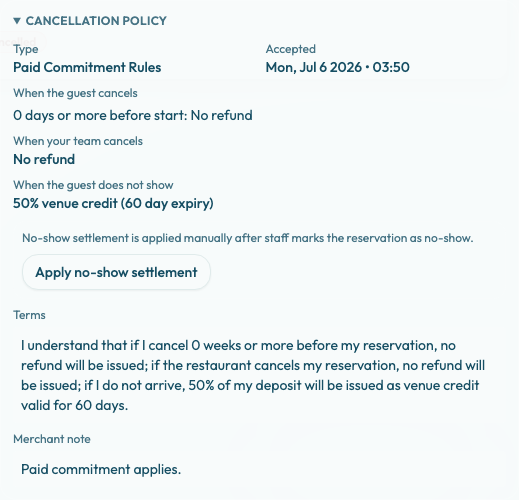
Open the reservation details sidebar after marking the reservation as no-show.
Before you apply it
The action appears in the Cancellation policy section only when all of these are true:
- The reservation status is NO_SHOW.
- The accepted cancellation policy type is PAID_COMMITMENT_RULES.
- No no-show settlement has already succeeded.
Staff must mark the reservation as no-show first. The backend refuses no-show settlement whenever the reservation status is not NO_SHOW.
Review the accepted policy snapshot before applying settlement. Reslify uses the policy accepted with that booking, not the current policy on the experience.
Apply the settlement
- Open Bookings.
- Open the reservation.
- If needed, update the reservation status to No-show.
- In Cancellation policy, review When the guest does not show, the accepted timestamp, and the terms.
- Confirm that the helper text says: "No-show settlement is applied manually after staff marks the reservation as no-show."
- Select Apply no-show settlement.
- Watch for No-show settlement applied or Failed to apply no-show settlement.
- Review Settlement history. Each entry is shown as
{trigger}: {outcome} · {status}.
Outcomes merchants may see
The outcome comes from When the guest does not show on the accepted paid-commitment policy.
- No refund keeps the eligible paid amount forfeited and records the settlement.
- Cash refund refunds the configured percentage through the supported payment provider when the reservation has refundable provider references.
- Venue credit issues the configured percentage as compensation venue credit, stored as a gift card with the policy expiry.
If a gift card was used on the original paid commitment, only the non-gift-card paid portion is available for cash refund. Any remaining eligible value can become venue credit instead, so one settlement can include both a provider refund and compensation credit.
Failure and duplicate protection
A succeeded no-show settlement is not applied twice. After success, the sidebar no longer offers the no-show settlement action for that reservation.
If settlement fails, Reslify records a failed settlement history entry and shows the failure toast. Because no succeeded no-show settlement exists yet, staff can fix the payment or credit issue and retry.
When not to apply it
Do not apply no-show settlement if the reservation status is wrong, the guest arrived under another booking, the restaurant caused the issue, the team has decided to make an exception, or the reservation uses a card guarantee instead of a paid commitment.