Payments & Revenue Protection
Consume gift-card value on a reservation
Understand how gift-card value is validated, attached, consumed, or released when it is applied to a reservation.
How guests apply a card
In the booking widget, the guest enters one Gift card code and selects Apply. The quote checks the selected time, experience, covers, add-ons, payment mode, merchant, card code, expiry, remaining balance, and whether the card is already ATTACHED to another reservation.
When the card can be used, the widget shows:
Gift card applied to this booking.Applied: {amount}Remainder: {amount}Remaining balance after booking: {amount}
Remove clears the code before the booking is submitted.
If the card cannot be used, the message may explain that the gift card was not found, expired, depleted, already attached to another reservation, or not applicable to this reservation. The quote is only a validation and preview step; value is not consumed until the reservation flow reaches the correct state.
What the ledger states mean
Gift-card usage is stored as ledger movement. The reservation workflow uses these states:
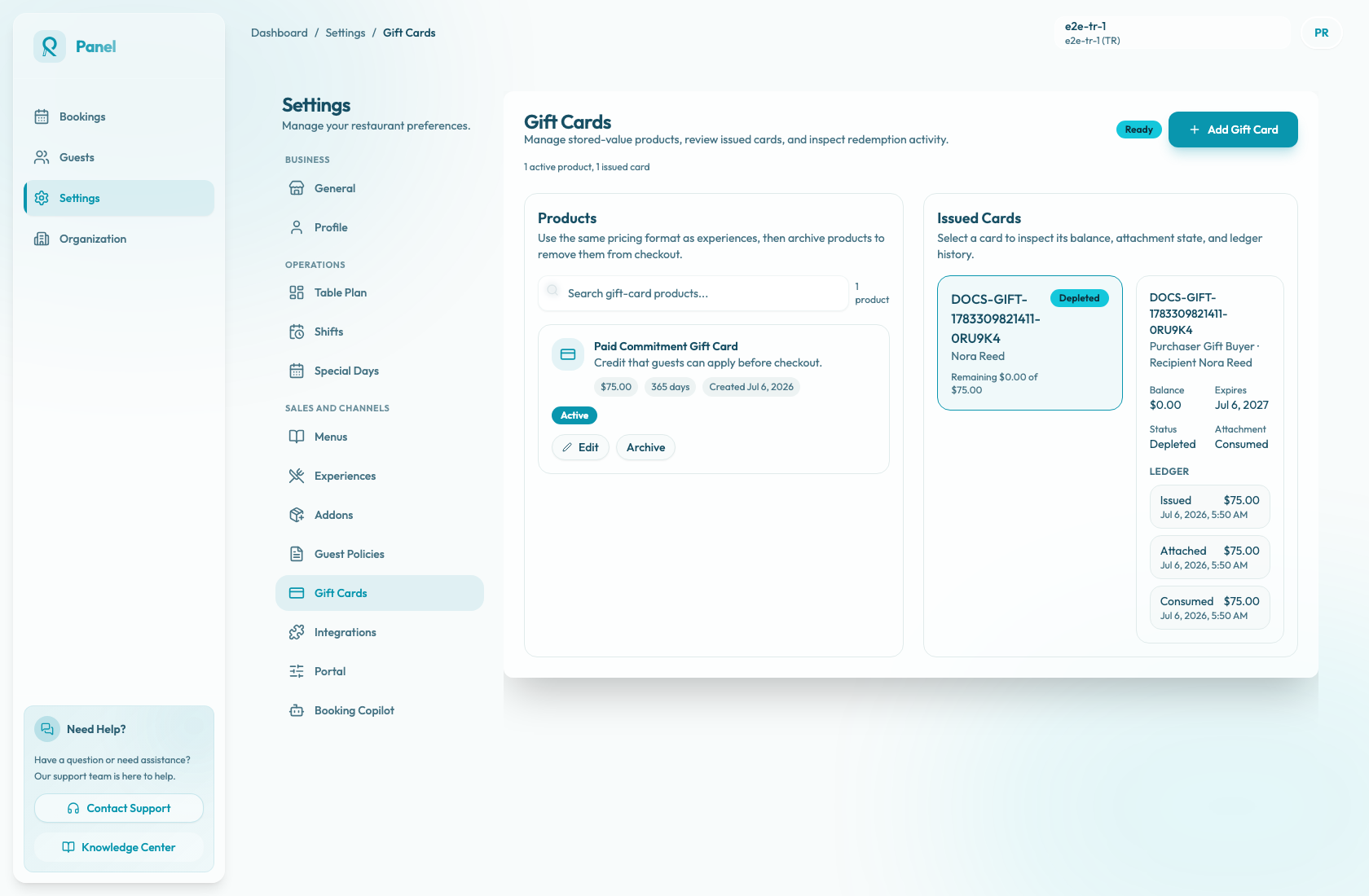
ISSUEDmeans the card value exists on the issued gift card.ATTACHEDmeans value is reserved for a reservation.CONSUMEDmeans the attached value has been spent by the reservation.RELEASEDmeans attached value was returned because the reservation, request, or payment intent was cancelled or closed after an abandoned or failed flow.
Expiry and depletion affect whether a card can be quoted, but they are not separate reservation-consumption ledger states.
What happens by reservation flow
For strict online payment flows, timing depends on whether the card covers the full online amount.
- If the gift card covers only part of the amount, Reslify creates a payment intent that records the applied gift-card amount and asks the guest to pay the remainder by Stripe or PAYTR. The gift-card attachment is consumed only after the payment provider confirms the payment.
- If the gift card covers the full online amount, no extra card payment is required. Reslify can create the reservation directly, attach the gift-card value, and consume it immediately.
- For pay-later, basic, request, and manual reservations, gift-card value may stay
ATTACHEDuntil staff consumes it from the reservation details sidebar.
If a reservation, request, or pending/failed payment intent is cancelled before consumption, Reslify releases the attached value so it can return to the card balance.
Consume attached value from a reservation
Open the reservation details sidebar and expand Gift card. The section shows:
Code: {value}Status: {value}Applied: {value}Remaining balance: {value}Expires: {value}
When Status: {value} is ATTACHED, select Consume attached value. A successful action shows Gift-card value consumed. If the attachment cannot be consumed, the panel shows Failed to consume gift-card value.
Manual consumption only works while the current gift-card attachment is ATTACHED. If the value is already CONSUMED, RELEASED, or no gift card is attached, staff should use the issued card ledger to explain the current balance instead of trying to consume again.
Review and explain balance changes
- Open Settings / Gift Cards.
- In Issued Cards, find the card by its code or recipient.
- Select the issued card to open its detail panel.
- Review the current balance, attachment status, and ledger entries.
- Confirm the reservation-related
ATTACHED,CONSUMED, orRELEASEDentry matches the booking.
Use the ledger when a guest asks why their balance changed. ATTACHED means the value was reserved, CONSUMED means it was spent, and RELEASED means it returned to the card.