Payments & Revenue Protection
Create a card guarantee policy
Require guests to save a card and allow the restaurant to charge a no-show or late-cancellation fee later.
What card guarantee means
A card guarantee saves the guest's card during booking without charging it immediately. The restaurant can later charge the accepted fee if the guest cancels late or does not show, based on the rules configured for the experience and accepted on that reservation.
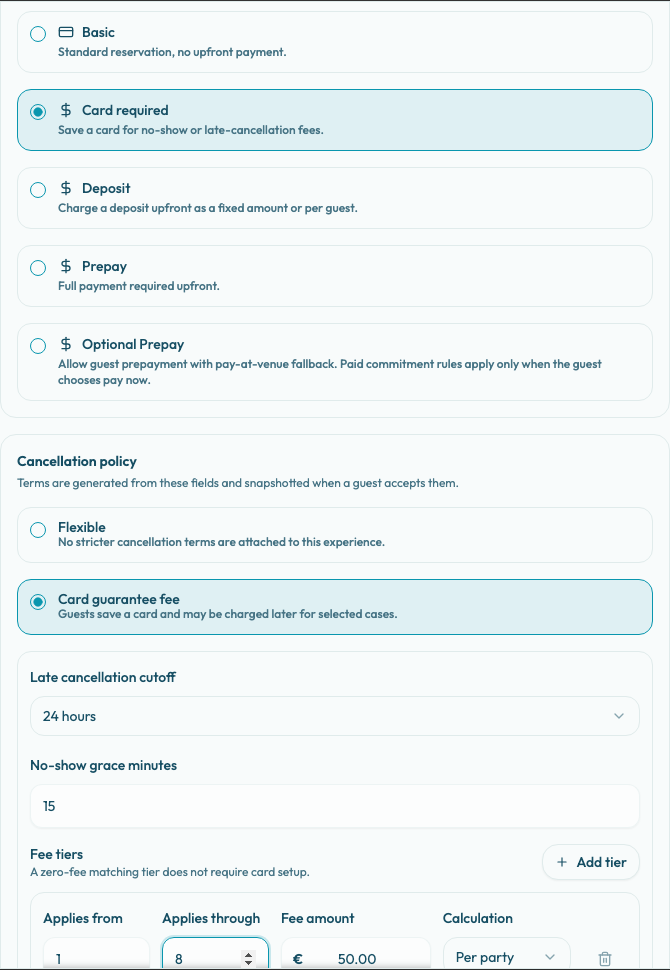
Use Card required when the restaurant wants a commitment but does not want to collect money upfront. Card guarantee is Stripe-only: the panel disables Card required when the merchant country is not supported or when Stripe is not connected with charges enabled.
Before you configure it
Confirm these items before publishing a card-guarantee experience:
- The restaurant has a Stripe connected account with charges enabled.
- The merchant country supports card guarantee.
- The experience's Reservation settings allow the party sizes that should be able to book.
- The team has decided whether late cancellations, no-shows, or both should be chargeable.
- The team has decided whether the fee is charged Per party or Per guest for each party-size tier.
PAYTR readiness does not enable card guarantee. If the restaurant uses PAYTR for other payment flows, it still needs Stripe readiness for Card required.
Configure card required
- Open Settings / Experiences.
- Create or edit the experience that should use the guarantee.
- Go to the Payment tab.
- In Payment policy, select Card required.
- In Cancellation policy, keep or select Card guarantee fee.
- Set Late cancellation cutoff.
- Set No-show grace minutes.
- Review Fee tiers.
- Use Add tier when different party sizes need different fees.
- Choose the charge cases under Charge this fee when.
- Save the experience.
When Card required is selected, the available cancellation policy choices are Flexible and Card guarantee fee. Card guarantee fee is the default and the policy to use for an actual chargeable guarantee. Flexible attaches no stricter cancellation terms to the experience.
Configure fee tiers
Fee tiers decide which party sizes require card setup and how much can be charged later.
For each tier, set:
- Applies from: the smallest party size included in the tier.
- Applies through: the largest party size included in the tier. Leave it blank only when the tier should have no upper limit.
- Fee amount: the fee for the tier.
- Calculation: choose Per party for one fee per reservation or Per guest to multiply the fee by the party size.
The preset Late cancellation cutoff options are 1 hour, 2 hours, 4 hours, 12 hours, 24 hours, 2 days, and 1 week. Existing experiences can also show a custom cutoff value if the saved policy uses one.
Under Charge this fee when, select at least one case:
- Guest cancels after the cutoff.
- Guest does not show up.
Reslify validates that at least one charge case is selected and that each tier's maximum party size is greater than or equal to its minimum party size.
Zero-fee matching tiers are intentionally allowed. A matching zero-fee tier does not require card setup, does not send the guest to the card guarantee step, and does not create a later charge amount for that party size. Use zero-fee tiers when some party sizes should continue through the normal approved or request flow while larger or higher-risk parties require a guarantee.
What guests accept
Guests only enter the card guarantee flow when their party size matches a positive fee tier. In the booking widget, the final action changes to Continue to card guarantee. The payment page then shows Save your card guarantee, Card guarantee details, and Save card guarantee.
No money is charged at booking. Stripe may authenticate and save the card for future off-session use, but the booking step is card setup, not payment collection.
Before saving the card, guests accept generated card guarantee terms. The terms explain when the card may be charged, the maximum fee, and the cases that apply.
Keep the fee amount, cutoff, and policy text aligned. If the restaurant says a late cancellation fee applies after 24 hours, the configured cutoff should match that promise.
How charging works later
A saved card does not charge automatically. If a reservation becomes no-show or late-cancel eligible, the reservation details sidebar shows the guarantee status and the available charge action.
The later charge and refund workflow uses the accepted terms and the reservation's stored card guarantee policy snapshot. If the experience policy changes after the guest booked, existing reservations still follow the terms and fee snapshot accepted for that reservation.
The team should review the reservation before charging. Only charge when the reservation status, cutoff, no-show grace minutes, and guest communication support the decision.