Reserve with Google & Integrations
Connect Reserve with Google
Understand what connecting Reserve with Google means before requesting activation for a restaurant.
What connection means
Reserve with Google lets guests reserve directly from Google surfaces such as Search and Maps after the restaurant is eligible and activated. Reslify publishes the restaurant's bookable availability to Google and receives reservation requests through the Google channel.
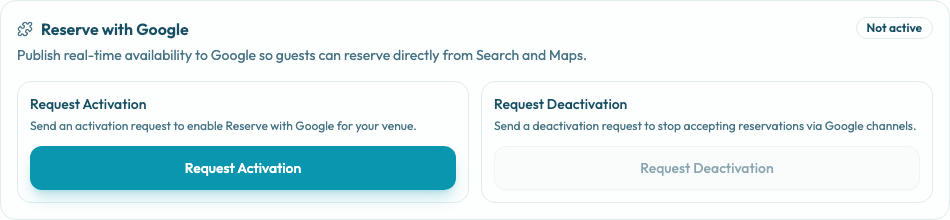
Manage the request from Settings / Integrations on the active restaurant. The Reserve with Google card shows the channel state as Not active or Active and exposes the operational actions Request Activation and Request Deactivation.
Before connecting
Check these items before requesting activation:
- The active restaurant is the correct location.
- The restaurant profile details are current: name, website, phone, address, location, and terms.
- The Google Business Profile is live and matches the restaurant identity.
- The restaurant has a currency configured.
- Experiences, shifts, tables, capacity, and available slots are configured.
- Booking rules are ready for public traffic.
- Payment policies are compatible with Google channel requirements for the experiences you want to expose.
What the panel action does
Selecting Request Activation records the request in the panel, but it does not by itself turn on Google production traffic. Google publishing depends on Reslify enablement for the merchant, the merchant's persisted Google integration setting, feed readiness, and operational approval for the Google channel.
What happens after activation
Once active, eligible users can reserve from Google Search and Maps when Google shows reservation entry points for the restaurant's services and times. Reslify supplies inventory through Google feeds and live booking APIs, so the team should keep shifts, special days, experiences, payment policies, and tables accurate.