Troubleshooting
No slots appear for an experience
Find why a specific experience has no guest-facing slots even though the restaurant has availability.
Start with the exact guest search
If one experience has no slots while another experience works, first reproduce the guest path with the same inputs:
- the public booking page or widget the guest used
- the same party size
- the same date
- the same location or area, if the page asks for one
- the same experience
The public booking flow searches by date, party size, and optional area, then filters the returned slots by the selected experience. If the guest sees No available slots found, No available slots on this date, or This experience is not available for the selected slot, continue with the checks below.
Check the experience rules first
Open Settings / Experiences, edit the affected experience, and select the Reservation tab.
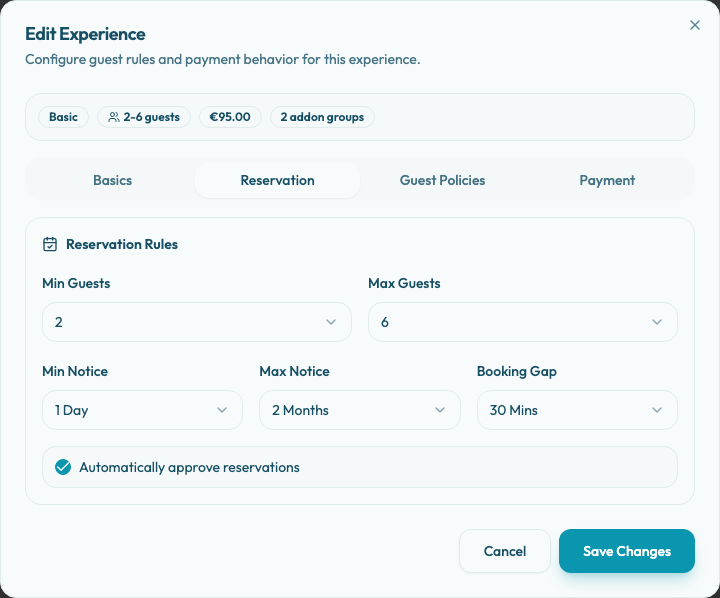
Confirm these fields against the guest search:
- Min Guests and Max Guests include the guest's party size.
- Min Notice allows the guest to book soon enough. A same-day request can disappear when the experience needs more notice.
- Max Notice includes the selected date. Before a guest chooses an experience, the date picker may reflect another active experience with a wider booking window.
- Booking Gap is realistic. The gap is added to the experience duration when Reslify checks table overlap.
- The experience is not archived. Archived experiences are hidden from active booking flows.
The current Reservation tab does not show a separate duration field, but the stored experience duration still affects availability. If only this experience is missing, compare its stored duration and any party-size-specific duration rules with a working experience.
Confirm the shift serves this experience
Open Settings / Shifts and find the weekly shift for the affected date and time. If the date has a Special Days override, open Settings / Special Days instead, because the special-day shift calendar replaces the normal weekly shifts for that date.
In the shift dialog, review Table Availability by Experience:
- Find the affected experience row.
- If it shows Not bookable or zero selected tables, choose Manage Tables.
- Assign at least one table that can serve this experience during that shift.
- Save the shift or the special-day override.
The shift-level Bookable state only means at least one experience has at least one table. It does not make every experience bookable. An experience with no selected tables in that shift will not generate guest-facing slots for that shift.
Check table and combination fit
Open Settings / Table Plan and confirm the selected inventory can seat the guest's party size.
A table or combination must fit the party size. For example, if the guest searches for 6 people, the affected experience needs a selected table or a valid combination whose capacity includes 6.
For combinations, both setup steps matter:
- The combination must exist in Table Plan.
- Every table in that combination must also be selected for the experience inside Table Availability by Experience.
The Max capacity number on an experience row is useful for a quick check, but it is not the same as proving a specific party size can sit together. A group may still need one table or one configured combination that fits the party.
Check special days and existing bookings
If the date is a holiday, closure, private event, or one-off service day, inspect Special Days before changing the weekly shift. A closed special day removes availability. A special-day shift calendar replaces weekly shifts and needs its own table availability for the affected experience.
Then open Bookings for the same date and time. Existing reservations, pending booking activity, and temporary slot holds can consume the assigned tables. Reslify checks the experience duration plus Booking Gap when it looks for table overlap, so a nearby reservation can block a slot even when the exact start time looks open.
If the slot appears in the panel but not publicly
Panel users may be able to create manual reservations with warnings or overrides that guests cannot use. Public slots must pass the guest-facing rules without a staff override.